Decorator 패턴
기존 객체를 수정하지 않고 새로운 기능을 동적으로 추가하는 Decorator 패턴을 알아봅니다.
#카페 주문 시스템의 악몽
커피숍 주문 시스템을 만든다고 해보자.
아메리카노에 샷 추가, 시럽 추가, 우유 변경, 크기 변경...
이 모든 조합을 상속으로 만들면?
Coffee
├── Americano
│   ├── AmericanoWithExtraShot
│   ├── AmericanoWithSyrup
│   ├── AmericanoWithExtraShotAndSyrup
│   ├── AmericanoWithOatMilk
│   ├── AmericanoWithExtraShotAndOatMilk
│   └── ... 😵
├── Latte
│   ├── LatteWithExtraShot
│   └── ... 끝이 없다

옵션이 추가될 때마다 클래스가 기하급수적으로 늘어난다.
Decorator 패턴은 상속 대신 감싸기(wrapping) 로 이 문제를 해결한다.
visible: false
Decorator란?
객체를 래퍼(wrapper) 객체로 감싸서 새로운 기능을 동적으로 추가하는 패턴
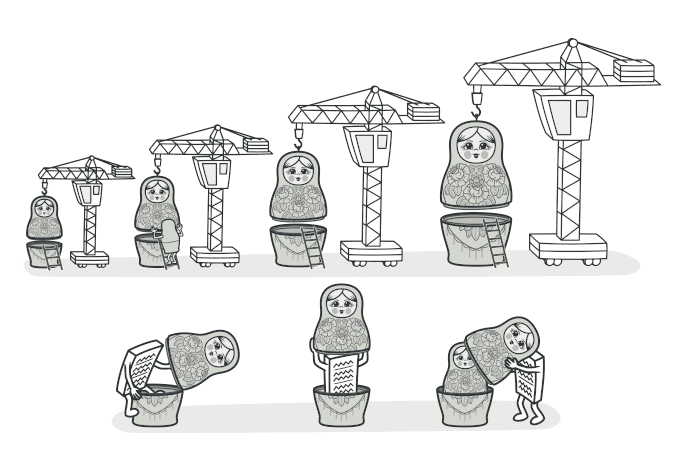
마트료시카 인형을 생각하면 된다. 인형 안에 인형이 있고, 그 안에 또 인형이 있다.
각 레이어가 하나의 기능을 추가하고, 안쪽의 원본은 그대로 유지된다.
[시럽 추가 데코레이터]
  └── [샷 추가 데코레이터]
        └── [아메리카노 (원본)]
visible: false
코드로 보기
커피 주문 시스템
// Component — 기본 인터페이스
interface Coffee {
  getCost(): number;
  getDescription(): string;
}

// Concrete Component — 기본 커피들
class Americano implements Coffee {
  getCost() {
    return 4000;
  }
  getDescription() {
    return "아메리카노";
  }
}

class Latte implements Coffee {
  getCost() {
    return 4500;
  }
  getDescription() {
    return "라떼";
  }
}

// Base Decorator — 데코레이터의 뼈대
abstract class CoffeeDecorator implements Coffee {
  constructor(protected coffee: Coffee) {} // 💡 감싸는 대상

  getCost(): number {
    return this.coffee.getCost();
  }

  getDescription(): string {
    return this.coffee.getDescription();
  }
}

// Concrete Decorators — 각 옵션
class ExtraShotDecorator extends CoffeeDecorator {
  getCost() {
    return this.coffee.getCost() + 500;
  }
  getDescription() {
    return this.coffee.getDescription() + " + 샷 추가";
  }
}

class SyrupDecorator extends CoffeeDecorator {
  constructor(
    coffee: Coffee,
    private syrupType: string,
  ) {
    super(coffee);
  }

  getCost() {
    return this.coffee.getCost() + 300;
  }
  getDescription() {
    return this.coffee.getDescription() + ` + ${this.syrupType} 시럽`;
  }
}

class SizeUpDecorator extends CoffeeDecorator {
  getCost() {
    return this.coffee.getCost() + 700;
  }
  getDescription() {
    return this.coffee.getDescription() + " (사이즈업)";
  }
}

class OatMilkDecorator extends CoffeeDecorator {
  getCost() {
    return this.coffee.getCost() + 600;
  }
  getDescription() {
    return this.coffee.getDescription() + " + 오트밀크";
  }
}
사용
// 기본 아메리카노
let coffee: Coffee = new Americano();
console.log(`${coffee.getDescription()}: ${coffee.getCost()}원`);
// 아메리카노: 4000원

// 샷 추가!
coffee = new ExtraShotDecorator(coffee);
console.log(`${coffee.getDescription()}: ${coffee.getCost()}원`);
// 아메리카노 + 샷 추가: 4500원

// 바닐라 시럽도!
coffee = new SyrupDecorator(coffee, "바닐라");
console.log(`${coffee.getDescription()}: ${coffee.getCost()}원`);
// 아메리카노 + 샷 추가 + 바닐라 시럽: 4800원

// 사이즈업까지!
coffee = new SizeUpDecorator(coffee);
console.log(`${coffee.getDescription()}: ${coffee.getCost()}원`);
// 아메리카노 + 샷 추가 + 바닐라 시럽 (사이즈업): 5500원
옵션을 자유롭게 조합할 수 있고, 새 옵션이 추가되어도 기존 코드를 수정할 필요가 없다.
visible: false
더 실용적인 예시: API 미들웨어
// 기본 API 클라이언트
interface HttpClient {
  request(url: string, options?: RequestInit): Promise<Response>;
}

class BaseHttpClient implements HttpClient {
  async request(url: string, options?: RequestInit) {
    return fetch(url, options);
  }
}

// Decorator: 인증 헤더 추가
class AuthDecorator implements HttpClient {
  constructor(
    private client: HttpClient,
    private token: string,
  ) {}

  async request(url: string, options: RequestInit = {}) {
    const headers = new Headers(options.headers);
    headers.set("Authorization", `Bearer ${this.token}`);
    return this.client.request(url, { ...options, headers });
  }
}

// Decorator: 로깅
class LoggingDecorator implements HttpClient {
  constructor(private client: HttpClient) {}

  async request(url: string, options?: RequestInit) {
    console.log(`[REQ] ${options?.method ?? "GET"} ${url}`);
    const start = Date.now();
    const response = await this.client.request(url, options);
    console.log(`[RES] ${response.status} (${Date.now() - start}ms)`);
    return response;
  }
}

// Decorator: 재시도
class RetryDecorator implements HttpClient {
  constructor(
    private client: HttpClient,
    private maxRetries: number = 3,
  ) {}

  async request(url: string, options?: RequestInit) {
    let lastError: Error | null = null;

    for (let i = 0; i <= this.maxRetries; i++) {
      try {
        return await this.client.request(url, options);
      } catch (error) {
        lastError = error as Error;
        console.log(`재시도 ${i + 1}/${this.maxRetries}...`);
      }
    }

    throw lastError;
  }
}

// Decorator: 캐싱
class CacheDecorator implements HttpClient {
  private cache = new Map<string, Response>();

  constructor(
    private client: HttpClient,
    private ttl: number = 60000,
  ) {}

  async request(url: string, options?: RequestInit) {
    const method = options?.method ?? "GET";

    // GET 요청만 캐싱
    if (method === "GET" && this.cache.has(url)) {
      console.log(`[CACHE HIT] ${url}`);
      return this.cache.get(url)!.clone();
    }

    const response = await this.client.request(url, options);

    if (method === "GET") {
      this.cache.set(url, response.clone());
      setTimeout(() => this.cache.delete(url), this.ttl);
    }

    return response;
  }
}
조합
// 필요한 기능만 골라서 조합
let client: HttpClient = new BaseHttpClient();
client = new AuthDecorator(client, "my-jwt-token");
client = new LoggingDecorator(client);
client = new RetryDecorator(client, 3);
client = new CacheDecorator(client, 30000);

// 사용 — 인증 + 로깅 + 재시도 + 캐싱이 모두 적용됨
const response = await client.request("/api/users");
Express의 미들웨어 체인도 본질적으로 이 구조다.
visible: false
TypeScript의 실제 Decorator
TypeScript에는 @decorator 문법이 있다.
// TypeScript 데코레이터 (Stage 3)
class UserService {
  @Log
  @Validate
  @Cache(60)
  async getUser(id: string) {
    return await db.query(`SELECT * FROM users WHERE id = $1`, [id]);
  }
}
NestJS를 써본 사람이라면 @Controller(), @Get(), @Injectable() 같은 데코레이터가 익숙할 것이다.
이 문법적 데코레이터와 디자인 패턴 Decorator는 이름은 같지만 구현 방식이 약간 다르다. 하지만 핵심 아이디어는 동일하다.
기존 코드를 수정하지 않고 기능을 추가하는 것.
visible: false
언제 사용하면 좋을까?
-
기존 객체에 기능을 동적으로 추가/제거하고 싶을 때
- 런타임에 "이 요청에는 캐싱 켜줘, 저 요청에는 꺼줘"
-
상속으로 기능을 확장하기 어려울 때
- 조합이 너무 많아서 서브클래스가 폭발할 때
-
횡단 관심사(cross-cutting concerns)를 분리하고 싶을 때
- 로깅, 인증, 캐싱, 에러 핸들링 등
visible: false
장단점
| 장점 | 단점 |
|---|---|
| 기존 코드 수정 없이 기능 추가 | 래퍼가 많아지면 디버깅이 어려움 |
| 기능을 자유롭게 조합 가능 | 데코레이터 순서가 결과에 영향을 줌 |
| SRP — 각 데코레이터가 하나의 책임 | 초기 설정 코드가 길어질 수 있음 |
| 런타임에 동적으로 기능 추가/제거 |
visible: false
정리하며
Decorator는 감싸기를 통해 기능을 추가하는 패턴이다.
핵심을 한 줄로 요약하면,
"바꾸지 말고 감싸라"
상속은 컴파일 타임에 고정되지만, Decorator는 런타임에 자유롭게 조합할 수 있다는 것이 가장 큰 장점이다.
다음 글에서는 복잡한 시스템을 간단한 인터페이스로 감싸는 Facade 패턴을 알아보겠다.
visible: false
#Reference
Refactoring Guru - Decorator
refactoring.guru