Builder 패턴
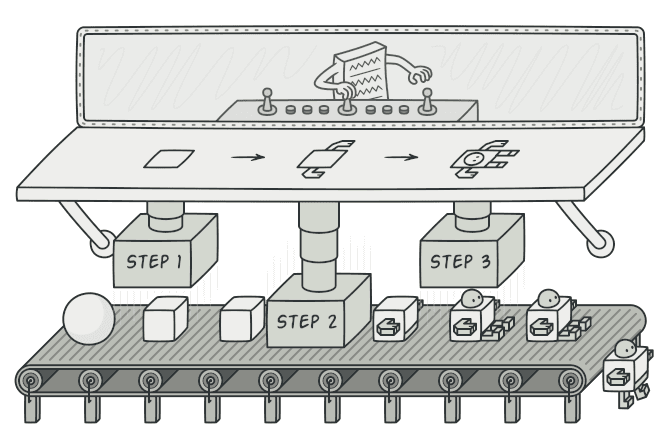
복잡한 객체를 단계별로 조립하는 Builder 패턴을 알아봅니다.
#생성자에 매개변수가 10개?
이런 코드를 본 적 있는가?
const user = new User(
  "junbeom",
  "junbeom@email.com",
  25,
  "Seoul",
  "Korea",
  "010-1234-5678",
  true,
  false,
  "dark",
  "ko",
  undefined, // avatar
  undefined, // bio
);
생성자 매개변수가 12개다. 어떤 게 뭔지도 모르겠고, undefined를 넣어야 하는 것도 있다.
이걸 Telescoping Constructor(점층적 생성자) 문제라고 부른다.
매개변수가 하나 추가될 때마다 생성자가 점점 길어지는 안티패턴이다.
이 문제를 우아하게 해결하는 패턴이 Builder다.
visible: false
Builder란?
복잡한 객체의 생성 과정과 표현 방법을 분리하여, 같은 생성 절차에서 다른 표현을 만들 수 있게 하는 패턴
쉽게 말하면 서브웨이와 같다.
서브웨이에서 샌드위치를 주문할 때, 빵 → 치즈 → 야채 → 소스를 단계별로 선택한다.
모든 재료를 한 번에 외칠 필요 없이, 하나씩 골라서 조립하면 된다.
visible: false
코드로 보기
Before: Telescoping Constructor
class HttpRequest {
  constructor(
    method: string,
    url: string,
    headers?: Record<string, string>,
    body?: string,
    timeout?: number,
    retries?: number,
    auth?: { username: string; password: string },
    cache?: boolean,
  ) {
    // ...
  }
}

// 🤮 어떤 파라미터가 뭔지 알 수가 없다
const request = new HttpRequest(
  "POST",
  "/api/users",
  { "Content-Type": "application/json" },
  JSON.stringify({ name: "junbeom" }),
  5000,
  3,
  undefined, // auth 안 쓰는데 undefined를 넣어야 함
  true,
);
After: Builder 패턴 적용
// 1. Product — 최종 결과물
class HttpRequest {
  method: string = "GET";
  url: string = "";
  headers: Record<string, string> = {};
  body?: string;
  timeout: number = 30000;
  retries: number = 0;
  auth?: { username: string; password: string };
  cache: boolean = false;
}

// 2. Builder
class HttpRequestBuilder {
  private request: HttpRequest;

  constructor() {
    this.request = new HttpRequest();
  }

  setMethod(method: string): this {
    this.request.method = method;
    return this; // 💡 this를 반환해서 체이닝 가능
  }

  setUrl(url: string): this {
    this.request.url = url;
    return this;
  }

  setHeader(key: string, value: string): this {
    this.request.headers[key] = value;
    return this;
  }

  setBody(body: string): this {
    this.request.body = body;
    return this;
  }

  setTimeout(timeout: number): this {
    this.request.timeout = timeout;
    return this;
  }

  setRetries(retries: number): this {
    this.request.retries = retries;
    return this;
  }

  setAuth(username: string, password: string): this {
    this.request.auth = { username, password };
    return this;
  }

  enableCache(): this {
    this.request.cache = true;
    return this;
  }

  build(): HttpRequest {
    // 유효성 검증도 여기서 할 수 있다
    if (!this.request.url) {
      throw new Error("URL은 필수입니다");
    }
    return this.request;
  }
}
사용하면 이렇게 깔끔해진다.
const request = new HttpRequestBuilder()
  .setMethod("POST")
  .setUrl("/api/users")
  .setHeader("Content-Type", "application/json")
  .setBody(JSON.stringify({ name: "junbeom" }))
  .setTimeout(5000)
  .setRetries(3)
  .enableCache()
  .build();
각 메서드 이름 덕분에 뭘 설정하는지 한눈에 보인다. 필요 없는 건 그냥 안 쓰면 된다.
visible: false
Director: 미리 정의된 레시피
자주 사용하는 조합이 있다면 Director를 만들어서 재사용할 수 있다.
class HttpRequestDirector {
  // GET 요청을 위한 미리 정의된 레시피
  static createGetRequest(url: string): HttpRequest {
    return new HttpRequestBuilder()
      .setMethod("GET")
      .setUrl(url)
      .enableCache()
      .build();
  }

  // 인증이 필요한 POST 요청 레시피
  static createAuthenticatedPost(
    url: string,
    body: string,
    token: string,
  ): HttpRequest {
    return new HttpRequestBuilder()
      .setMethod("POST")
      .setUrl(url)
      .setHeader("Authorization", `Bearer ${token}`)
      .setHeader("Content-Type", "application/json")
      .setBody(body)
      .setTimeout(10000)
      .setRetries(3)
      .build();
  }
}

// 사용
const users = HttpRequestDirector.createGetRequest("/api/users");
const newPost = HttpRequestDirector.createAuthenticatedPost(
  "/api/posts",
  JSON.stringify({ title: "Builder 패턴" }),
  "my-jwt-token",
);
Director는 자주 쓰는 조합을 캡슐화하는 역할이다.
서브웨이로 치면 "이탈리안 BMT 세트"처럼 인기 메뉴를 미리 정해놓은 것이다.
visible: false
실무에서 볼 수 있는 Builder 패턴
사실 우리는 이미 Builder 패턴을 많이 쓰고 있다.
Prisma ORM
const users = await prisma.user.findMany({
  where: { age: { gte: 20 } },
  orderBy: { createdAt: "desc" },
  take: 10,
  include: { posts: true },
});
Zod (스키마 검증)
const userSchema = z.object({
  name: z.string().min(2).max(50),
  email: z.string().email(),
  age: z.number().int().positive().optional(),
});
Express Router
app
  .route("/users")
  .get(getUsers)
  .post(createUser)
  .put(updateUser)
  .delete(deleteUser);
메서드 체이닝으로 단계별 설정을 하는 것들은 대부분 Builder 패턴의 변형이다.
visible: false
언제 사용하면 좋을까?
-
생성자 매개변수가 많을 때
- 특히 선택적 매개변수가 많은 경우
-
같은 생성 과정으로 다른 표현을 만들어야 할 때
- HTML/Markdown/PDF를 같은 데이터에서 생성
-
객체 생성 시 유효성 검증이 필요할 때
build()메서드에서 한꺼번에 검증 가능
-
불변(Immutable) 객체를 만들고 싶을 때
- Builder로 조립 후
build()에서 freeze된 객체 반환
- Builder로 조립 후
visible: false
장단점
| 장점 | 단점 |
|---|---|
| 가독성 향상 (메서드 체이닝) | 클래스가 하나 더 필요함 |
| 선택적 매개변수를 깔끔하게 처리 | 간단한 객체에는 오버킬 |
| 같은 빌더로 다양한 표현 생성 가능 | Builder와 Product의 동기화가 필요 |
build() 시점에 유효성 검증 가능 |
visible: false
정리하며
Builder는 복잡한 객체를 단계별로 조립하는 패턴이다.
핵심을 한 줄로 요약하면,
"한 번에 다 넣지 말고, 하나씩 골라서 조립해라"
생성자에 매개변수가 4개 이상이 되기 시작하면, Builder 패턴을 한 번 고려해보자.
특히 TypeScript에서는 메서드 체이닝과 타입 추론 덕분에 Builder가 매우 자연스럽게 들어맞는다.
다음 글에서는 기존 객체를 복제해서 새로운 객체를 만드는 Prototype 패턴을 알아보겠다.
visible: false
#Reference
Refactoring Guru - Builder
refactoring.guru