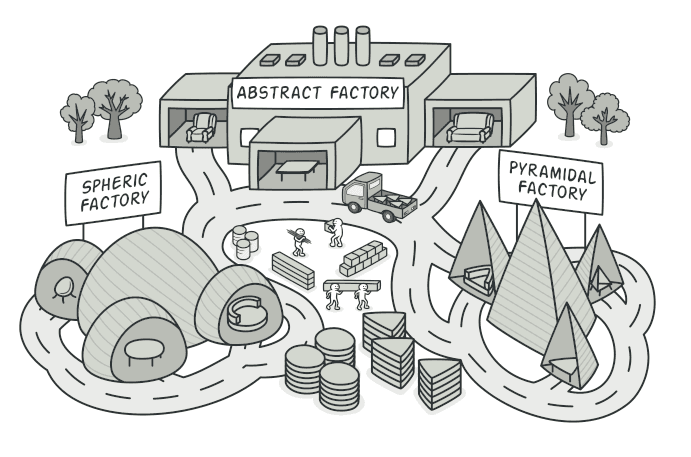
Abstract Factory 패턴
관련된 객체들의 가족을 통째로 생성하는 Abstract Factory 패턴을 알아봅니다.
#가구를 사러 왔는데 의자만 모던이고 소파는 빈티지?
이전 글에서 Factory Method를 알아봤다.
Factory Method는 하나의 객체 생성을 서브클래스에 위임하는 패턴이었다.
그런데 만약 서로 관련된 여러 객체를 함께 생성해야 한다면?
예를 들어, UI 컴포넌트 라이브러리를 만든다고 해보자.
// 다크 테마면 다크 버튼 + 다크 인풋 + 다크 모달
// 라이트 테마면 라이트 버튼 + 라이트 인풋 + 라이트 모달

const button = new DarkButton();
const input = new LightInput(); // 🤢 테마가 섞여버렸다
const modal = new DarkModal();
다크 테마 버튼에 라이트 테마 인풋이 조합되면? 디자이너가 기절한다.
관련 있는 객체들은 반드시 같은 가족끼리 생성되어야 한다. 이걸 보장해주는 패턴이 Abstract Factory다.
visible: false
Abstract Factory란?
관련된 객체들의 가족(family)을 생성하는 인터페이스를 제공하되, 구체적인 클래스를 지정하지 않는 패턴
Factory Method가 "하나의 제품"을 만드는 패턴이라면,
Abstract Factory는 "관련 제품군 전체"를 만드는 패턴이다.
IKEA에 비유하면, "모던 스타일 세트"를 주문하면 모던 의자 + 모던 소파 + 모던 테이블이 오는 것이다.
개별로 고르는 게 아니라 세트로 묶어서 제공한다.
visible: false
구조
AbstractFactory
  ├── createButton(): Button
  ├── createInput(): Input
  └── createModal(): Modal

DarkThemeFactory (implements AbstractFactory)
  ├── createButton(): DarkButton
  ├── createInput(): DarkInput
  └── createModal(): DarkModal

LightThemeFactory (implements AbstractFactory)
  ├── createButton(): LightButton
  ├── createInput(): LightInput
  └── createModal(): LightModal
visible: false
코드로 보기
1단계: 제품 인터페이스 정의
// 각 제품군의 인터페이스
interface Button {
  render(): string;
  onClick(): void;
}

interface Input {
  render(): string;
  getValue(): string;
}

interface Modal {
  render(): string;
  open(): void;
  close(): void;
}
2단계: 구체적인 제품 구현
// 다크 테마 제품군
class DarkButton implements Button {
  render() {
    return '<button class="dark-btn">Click me</button>';
  }
  onClick() {
    console.log("Dark button clicked");
  }
}

class DarkInput implements Input {
  render() {
    return '<input class="dark-input" />';
  }
  getValue() {
    return "dark-value";
  }
}

class DarkModal implements Modal {
  render() {
    return '<div class="dark-modal">...</div>';
  }
  open() {
    console.log("Dark modal opened");
  }
  close() {
    console.log("Dark modal closed");
  }
}

// 라이트 테마 제품군
class LightButton implements Button {
  render() {
    return '<button class="light-btn">Click me</button>';
  }
  onClick() {
    console.log("Light button clicked");
  }
}

class LightInput implements Input {
  render() {
    return '<input class="light-input" />';
  }
  getValue() {
    return "light-value";
  }
}

class LightModal implements Modal {
  render() {
    return '<div class="light-modal">...</div>';
  }
  open() {
    console.log("Light modal opened");
  }
  close() {
    console.log("Light modal closed");
  }
}
3단계: Abstract Factory
// 추상 팩토리 인터페이스
interface UIFactory {
  createButton(): Button;
  createInput(): Input;
  createModal(): Modal;
}

// 다크 테마 팩토리
class DarkThemeFactory implements UIFactory {
  createButton(): Button {
    return new DarkButton();
  }
  createInput(): Input {
    return new DarkInput();
  }
  createModal(): Modal {
    return new DarkModal();
  }
}

// 라이트 테마 팩토리
class LightThemeFactory implements UIFactory {
  createButton(): Button {
    return new LightButton();
  }
  createInput(): Input {
    return new LightInput();
  }
  createModal(): Modal {
    return new LightModal();
  }
}
4단계: 클라이언트 코드
// 클라이언트는 UIFactory 인터페이스만 안다
function renderPage(factory: UIFactory) {
  const button = factory.createButton();
  const input = factory.createInput();
  const modal = factory.createModal();

  console.log(button.render());
  console.log(input.render());
  console.log(modal.render());
}

// 테마 전환이 이렇게 간단해진다
const theme = getUserPreference(); // "dark" | "light"
const factory =
  theme === "dark" ? new DarkThemeFactory() : new LightThemeFactory();

renderPage(factory);renderPage()는 다크인지 라이트인지 전혀 모른다. 그냥 factory가 주는 대로 쓸 뿐이다.
그리고 가장 중요한 점 — 테마가 절대 섞이지 않는다. DarkThemeFactory에서 LightInput이 나올 일은 없다.

visible: false
Factory Method vs Abstract Factory
이 둘이 헷갈리는 사람이 많다. 차이를 정리하면,
| Factory Method | Abstract Factory | |
|---|---|---|
| 생성 대상 | 하나의 제품 | 관련 제품군 (여러 개) |
| 핵심 | 상속을 통한 객체 생성 위임 | 관련 객체들의 일관된 생성 |
| 확장 | 새로운 제품 타입 추가 | 새로운 제품 가족 추가 |
| 비유 | 셰프가 요리 하나를 만듦 | 코스 요리 세트를 만듦 |
visible: false
언제 사용하면 좋을까?
-
관련 객체들이 함께 사용되어야 할 때
- UI 테마 (다크/라이트 컴포넌트 세트)
- 크로스 플랫폼 UI (Windows/Mac/Linux 컴포넌트 세트)
-
제품 가족 간의 일관성을 보장해야 할 때
- 다크 버튼 + 라이트 인풋 같은 조합을 원천 차단
-
플랫폼이나 환경에 따라 다른 구현이 필요할 때
- DB 드라이버 세트 (MySQL 커넥션 + MySQL 쿼리빌더 + MySQL 마이그레이션)
- 결제 시스템 (국내 결제 세트 vs 해외 결제 세트)
실무에서 흔히 보는 예시
- React의 Platform-specific 컴포넌트 —
react-native에서 iOS/Android별 컴포넌트 세트 - ORM의 DB 드라이버 — TypeORM이 MySQL/PostgreSQL/SQLite에 따라 다른 구현체 세트를 제공
- 테스트 환경 구성 — 실제 DB + 실제 캐시 vs Mock DB + Mock 캐시
visible: false
장단점
| 장점 | 단점 |
|---|---|
| 제품 가족의 일관성 보장 | 새로운 종류의 제품 추가가 어려움 |
| 구체 클래스와의 결합도를 낮춤 | 코드가 복잡해질 수 있음 (클래스 폭발) |
| 제품 교체가 팩토리 하나만 바꾸면 됨 | 모든 제품군이 같은 변형을 가져야 함 |
특히 "새로운 종류의 제품 추가가 어렵다"는 점에 주목하자.
버튼, 인풋, 모달 외에 Tooltip을 추가하려면? 모든 팩토리(DarkThemeFactory, LightThemeFactory)에 createTooltip()을 추가해야 한다.
반면 새로운 테마(예: "네온" 테마)를 추가하는 것은 쉽다. NeonThemeFactory만 만들면 된다.
visible: false
정리하며
Abstract Factory는 관련 객체들을 세트로 묶어서 생성하는 패턴이다.
핵심을 한 줄로 요약하면,
"관련 있는 것들은 한 곳에서 같이 만들어라"
테마, 플랫폼, 환경처럼 "변형(variant)" 개념이 있고, 각 변형마다 관련 객체 세트가 필요하다면 Abstract Factory를 고려해보자.
다음 글에서는 복잡한 객체를 단계적으로 조립하는 Builder 패턴을 알아보겠다.
visible: false
#Reference
Refactoring Guru - Abstract Factory
refactoring.guru