Template Method 패턴
알고리즘의 뼈대를 정의하고, 세부 단계를 서브클래스에서 재정의하는 Template Method 패턴을 알아본다.
#레시피는 같은데 요리가 다르다?
김치찌개를 끓이든 된장찌개를 끓이든 요리의 큰 흐름은 같다.
- 재료 준비 → 2. 조리 → 3. 플레이팅
다른 건 각 단계에서 무엇을 넣느냐뿐이다. 김치찌개에는 김치를, 된장찌개에는 된장을 넣는다. 하지만 "재료 손질 → 끓이기 → 그릇에 담기"라는 큰 뼈대는 절대 변하지 않는다.

코드에서도 마찬가지다. 알고리즘의 큰 흐름은 고정하되, 세부 단계만 바꿔 끼우고 싶을 때가 있다. 이럴 때 사용하는 것이 바로 Template Method 패턴이다.
visible: false
Template Method란?
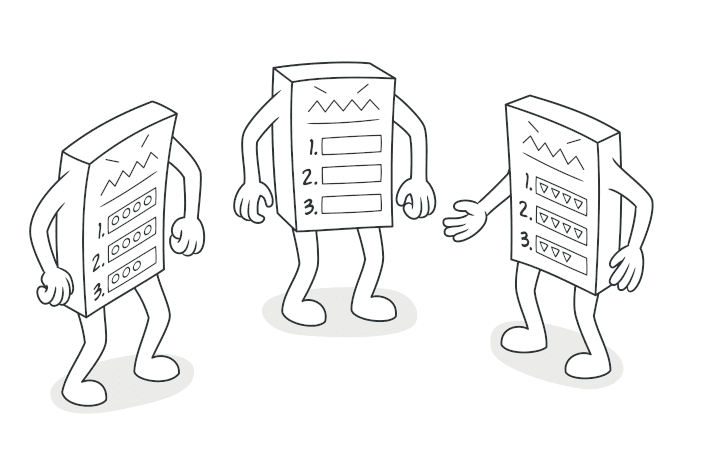
알고리즘의 뼈대(skeleton)를 상위 클래스에서 정의하고, 구체적인 단계는 서브클래스에서 재정의하게 하는 패턴
핵심은 두 가지다.
- 변하지 않는 흐름은 상위 클래스가 제어한다 (= template method)
- 변하는 세부 단계만 서브클래스가 구현한다 (= abstract steps)
상위 클래스가 "전체 순서를 내가 정할 테니, 너는 각 단계의 내용만 채워라"라고 말하는 셈이다.
visible: false
코드로 보기
데이터 처리 파이프라인
데이터를 가공하는 일은 보통 이런 흐름을 탄다.
읽기 → 파싱 → 검증 → 변환 → 저장
CSV를 처리하든 JSON을 처리하든 이 흐름 자체는 같다. 달라지는 건 각 단계의 구현뿐이다.
// 추상 클래스 — 알고리즘의 뼈대를 정의
abstract class DataProcessor<T> {
  // 🔒 Template Method — 이 순서는 바꿀 수 없다
  process(source: string): void {
    const raw = this.read(source);
    const parsed = this.parse(raw);
    this.validate(parsed);
    const transformed = this.transform(parsed);
    this.save(transformed);

    console.log("✅ 파이프라인 완료!");
  }

  // 서브클래스가 반드시 구현해야 하는 단계들
  protected abstract read(source: string): string;
  protected abstract parse(raw: string): T[];
  protected abstract validate(data: T[]): void;
  protected abstract transform(data: T[]): T[];

  // Hook — 기본 구현이 있지만, 필요하면 오버라이드 가능
  protected save(data: T[]): void {
    console.log(`💾 ${data.length}건 저장 완료`);
  }
}
process() 메서드가 바로 Template Method다. 알고리즘의 순서를 정의하고 있고, 서브클래스는 이 순서를 바꿀 수 없다. 바꿀 수 있는 건 각 단계의 내용뿐이다.
CSV 처리기
interface CsvRecord {
  name: string;
  email: string;
  age: number;
}

class CsvProcessor extends DataProcessor<CsvRecord> {
  protected read(source: string): string {
    console.log(`📄 CSV 파일 읽는 중: ${source}`);
    // 실제로는 fs.readFileSync 등을 사용
    return "name,email,age\n홍길동,hong@test.com,25\n김철수,kim@test.com,17";
  }

  protected parse(raw: string): CsvRecord[] {
    const [header, ...rows] = raw.split("\n");
    const keys = header.split(",");

    return rows.map((row) => {
      const values = row.split(",");
      return {
        name: values[0],
        email: values[1],
        age: Number(values[2]),
      };
    });
  }

  protected validate(data: CsvRecord[]): void {
    for (const record of data) {
      if (!record.email.includes("@")) {
        throw new Error(`유효하지 않은 이메일: ${record.email}`);
      }
      if (record.age < 0 || record.age > 150) {
        throw new Error(`유효하지 않은 나이: ${record.age}`);
      }
    }
    console.log(`✅ ${data.length}건 검증 통과`);
  }

  protected transform(data: CsvRecord[]): CsvRecord[] {
    // 미성년자 필터링
    return data.filter((record) => record.age >= 18);
  }
}
JSON 처리기
interface JsonRecord {
  id: string;
  payload: Record<string, unknown>;
  timestamp: number;
}

class JsonProcessor extends DataProcessor<JsonRecord> {
  protected read(source: string): string {
    console.log(`📋 JSON API 호출 중: ${source}`);
    return JSON.stringify([
      { id: "a1", payload: { action: "click" }, timestamp: Date.now() },
      {
        id: "a2",
        payload: { action: "scroll" },
        timestamp: Date.now() - 100000,
      },
    ]);
  }

  protected parse(raw: string): JsonRecord[] {
    return JSON.parse(raw);
  }

  protected validate(data: JsonRecord[]): void {
    for (const record of data) {
      if (!record.id || !record.payload) {
        throw new Error("필수 필드가 누락되었습니다");
      }
    }
    console.log(`✅ ${data.length}건 검증 통과`);
  }

  protected transform(data: JsonRecord[]): JsonRecord[] {
    // 최근 1시간 이내 이벤트만 남기기
    const oneHourAgo = Date.now() - 3600000;
    return data.filter((record) => record.timestamp > oneHourAgo);
  }

  // Hook 오버라이드 — 저장 방식 커스터마이징
  protected save(data: JsonRecord[]): void {
    console.log(`🗄️ NoSQL DB에 ${data.length}건 벌크 저장 완료`);
  }
}
사용
const csvProcessor = new CsvProcessor();
csvProcessor.process("users.csv");
// 📄 CSV 파일 읽는 중: users.csv
// ✅ 2건 검증 통과
// 💾 1건 저장 완료
// ✅ 파이프라인 완료!

const jsonProcessor = new JsonProcessor();
jsonProcessor.process("https://api.example.com/events");
// 📋 JSON API 호출 중: https://api.example.com/events
// ✅ 2건 검증 통과
// 🗄️ NoSQL DB에 1건 벌크 저장 완료
// ✅ 파이프라인 완료!
같은 process() 흐름을 타지만, 각 단계의 구현이 완전히 다르다. 이것이 Template Method의 핵심이다.

visible: false
이미 쓰고 있었을지도 모른다
Template Method는 프레임워크 곳곳에 숨어 있다.
React 클래스 컴포넌트 생명주기
// React가 정해놓은 생명주기 흐름:
// constructor → render → componentDidMount → (update) → componentWillUnmount
// 우리는 각 단계의 "내용"만 채운다

class UserProfile extends React.Component<Props, State> {
  // 1단계: 초기화
  constructor(props: Props) {
    super(props);
    this.state = { user: null, loading: true };
  }

  // 2단계: 마운트 후 데이터 로딩
  componentDidMount() {
    fetchUser(this.props.userId).then((user) => {
      this.setState({ user, loading: false });
    });
  }

  // 3단계: 렌더링
  render() {
    if (this.state.loading) return <Spinner />;
    return <div>{this.state.user.name}</div>;
  }

  // 4단계: 정리
  componentWillUnmount() {
    // 구독 해제, 타이머 정리 등
  }
}
React가 "생명주기의 순서"를 정해놓고, 우리는 각 메서드의 내용만 채운다. 전형적인 Template Method다.
테스트 프레임워크
// 테스트 프레임워크의 흐름: setup → test → teardown
// 이것도 Template Method다

describe("UserService", () => {
  let db: Database;

  // 1단계: 준비
  beforeEach(() => {
    db = new TestDatabase();
    db.seed(testData);
  });

  // 2단계: 실행
  it("should create user", () => {
    const user = userService.create({ name: "테스트" });
    expect(user.id).toBeDefined();
  });

  // 3단계: 정리
  afterEach(() => {
    db.cleanup();
  });
});
beforeEach → it → afterEach라는 뼈대를 프레임워크가 정하고, 개발자는 각 단계의 내용만 채운다.
visible: false
Template Method vs Strategy
이 두 패턴은 자주 비교된다. 둘 다 "알고리즘의 변형"을 다루기 때문이다.
// Template Method — 상속으로 단계를 변경
abstract class Sorter {
  sort(data: number[]): number[] {
    this.preProcess(data);
    const result = this.doSort(data);
    this.postProcess(result);
    return result;
  }

  protected preProcess(data: number[]): void {
    /* 기본 구현 */
  }
  protected abstract doSort(data: number[]): number[];
  protected postProcess(data: number[]): void {
    /* 기본 구현 */
  }
}

// Strategy — 합성으로 알고리즘 자체를 교체
interface SortStrategy {
  sort(data: number[]): number[];
}

class DataSorter {
  constructor(private strategy: SortStrategy) {}

  sort(data: number[]): number[] {
    return this.strategy.sort(data);
  }

  // 런타임에 전략 변경 가능!
  setStrategy(strategy: SortStrategy): void {
    this.strategy = strategy;
  }
}| Template Method | Strategy | |
|---|---|---|
| 변경 단위 | 알고리즘의 일부 단계 | 알고리즘 전체 |
| 변경 방법 | 상속 (extends) | 합성 (composition) |
| 변경 시점 | 컴파일 타임 (클래스 정의 시) | 런타임에도 가능 |
| 적합한 경우 | 뼈대는 고정, 단계만 다를 때 | 알고리즘 자체가 완전히 다를 때 |
한 줄로 요약하면,
- Template Method: "흐름은 내가 정할게, 각 단계 내용은 네가 채워"
- Strategy: "이 일을 어떻게 할지 통째로 네가 정해"
visible: false
언제 사용하면 좋을까?
-
알고리즘의 뼈대는 같은데, 세부 단계만 다를 때
- 데이터 처리 파이프라인, 파일 파서, 리포트 생성기
-
프레임워크를 설계할 때
- 사용자에게 "확장 포인트"를 제공하면서 전체 흐름은 통제하고 싶을 때
-
중복 코드를 제거하고 싶을 때
- 여러 클래스에서 거의 같은 알고리즘을 쓰는데 일부만 다르다면
visible: false
장단점
| 장점 | 단점 |
|---|---|
| 중복 코드를 상위 클래스로 모을 수 있다 | 상속에 의존하므로 유연성이 떨어질 수 있다 |
| 확장 포인트를 명확하게 제공한다 | 단계가 많아지면 구조가 복잡해진다 |
| 전체 흐름을 한 곳에서 제어한다 | 리스코프 치환 원칙을 위반할 수 있다 |
| Hook 메서드로 선택적 확장이 가능하다 | 서브클래스가 뼈대에 종속된다 |
visible: false
정리하며
Template Method는 알고리즘의 뼈대를 고정하고, 세부 단계만 서브클래스에 위임하는 패턴이다.
핵심을 한 줄로 요약하면,
"순서는 내가 정한다. 각 단계의 내용은 네가 채워라."
React의 생명주기, Jest의 테스트 흐름, Express의 라우트 핸들러까지 — 프레임워크를 사용하는 순간 이미 Template Method의 세계에 살고 있는 것이다.

visible: false
#Reference
Refactoring Guru - Template Method
refactoring.guru