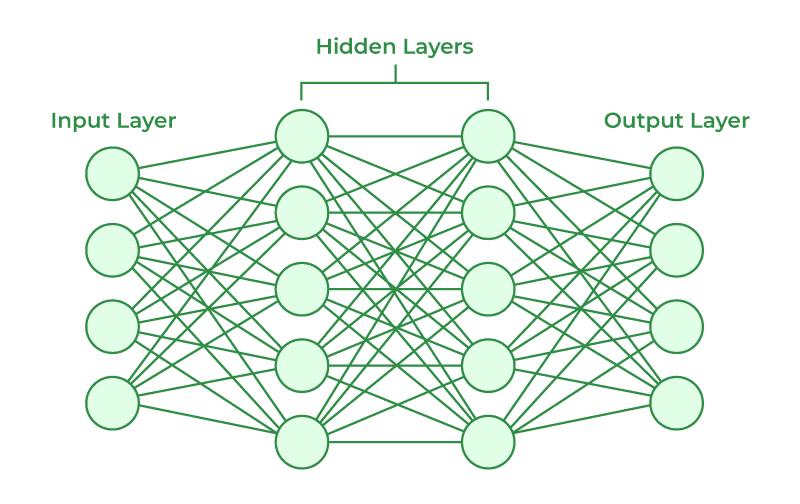
ANN 직접 만들어보기
Artificial Neural Network를 TensorFlow/Keras로 직접 구현하며 데이터 전처리부터 학습, 평가까지 단계별로 정리.
직접 간단한 Artificial Neural Network 인공신경망을 만들어보며, 중요한 코드들을 여기에 정리해보았다. ANN을 구축하는 과정을 요약하면 다음과 같다.
- Importing the libraries
- Data processing
- Importing the dataset
- Encoding categorical data
- Splitting the dataset into the Training set and Test set
- Feature Scaling
- Building the ANN
- Initializing the ANN
- Adding the input layer and the first hidden layer
- Adding the second hidden layer
- Adding the output layer
- Training the ANN
- Compiling the ANN
- Training the ANN on the Training set
- Making the predictions and evaluating the model
- Predicting the result of a single observation
- Predicting the Test set results
- Making the Confusion Matrix
#0. Importing the libraries
import numpy as np
import pandas as pd
import tensorflow as tf#1. Data processing
Importing the dataset
dataset = pd.read_csv('[file]')
X = dataset.iloc[:, 3:-1].values
y = dataset.iloc[:, -1].valuesiloc의 첫 번째 인자는 행, 두 번째 인자는 열이다. 즉 iloc은 필요한 부분만큼 자르는 함수이다.
Encoding categorical data
from sklearn.preprocessing import LabelEncoder
le = LabelEncoder()
X[:, 2] = le.fit_transform(X[:, 2])LabelEncoder는 ["한국", "중국", "일본"] 이런 값을 [0, 1, 2]의 형태로 라벨을 붙여줄 수 있다.
주의: 범주 간 수치적 순서가 있다고 잘못 해석할 수 있다.
LabelEncoder를 사용하면 좋은 경우:
- 성별처럼 male과 female 두 개로 나눌 수 있는 경우
- 실제로 상관관계로 라벨링할 수 있는 경우 ([Low, Medium, High])
범주가 3개 이상이고 수치적 순서가 없는 경우에는 OneHotEncoder를 사용하면 된다.
from sklearn.compose import ColumnTransformer
from sklearn.preprocessing import OneHotEncoder
ct = ColumnTransformer(transformers=[('encoder', OneHotEncoder(), [0])], remainder='passthrough')
X = np.array(ct.fit_transform(X))
Splitting the dataset into the Training set and Test set
from sklearn.model_selection import train_test_split
X_train, X_test, y_train, y_test = train_test_split(X, y, test_size = 0.2, random_state = 1)
Feature Scaling
from sklearn.preprocessing import StandardScaler
sc = StandardScaler()
X_train[:, 3:] = sc.fit_transform(X_train[:, 3:])
X_test[:, 3:] = sc.transform(X_test[:, 3:])
Feature Scaling이 필요한 이유:
- Feature 간의 스케일 차이 때문
Gradient Descent의 효율 향상 (Feature 값의 스케일이 다르면 손실 함수의 모양이 찌그러진 타원형이 되어 최적점까지 가는 시간이 더 걸림)
| 메서드 | 역할 | 언제 사용? |
|---|---|---|
fit | 데이터의 통계값(평균, 표준편차 등) 계산만 함 | 처음 학습 데이터에 사용 |
transform | 저장된 통계값을 이용해 실제 데이터를 변환함 | 테스트 데이터나 새 데이터에 사용 |
fit_transform | fit() + transform()을 한 번에 실행 | 학습 데이터에 사용 |
테스트 데이터에 fit_transform을 쓰게 되면 새로운 통계값이 계산되므로, 테스트 데이터에는 그냥 transform만 사용하자.
#2. Building the ANN
Initializing the ANN
ann = tf.keras.models.Sequential()Sequential 모델은 딥러닝 모델 중 가장 기본적이고 단순한 형태로, 순차적으로 레이어를 쌓는 방식이다.
| 모델 종류 | 설명 | 장점 | 단점 |
|---|---|---|---|
| Sequential | 순차적 모델, 층이 한 줄로 연결됨 | 간단하고 직관적 | 복잡한 모델 불가 |
| Functional API | 입력과 출력을 명시하여 모델 구성 | 유연함 (다중 입출력, 병렬 구조) | 코드가 복잡해질 수 있음 |
| Model Subclassing | Model 클래스를 상속해서 직접 모델 정의 | 가장 유연함, 커스터마이징 쉬움 | 유지보수 어려움 |
Adding the input layer and the first, second hidden layer
ann.add(tf.keras.layers.Dense(units=6, activation='relu'))Dense 파라미터:
units: 만들어 낼 뉴런 수activation: 활성화 함수
units 파라미터는 딥러닝 모델 설계에서 매우 중요하며, 정답은 없고 경험과 실험을 통해 찾는 값이다.
Dense layer는 이전 레이어의 모든 뉴런과 현재 레이어의 모든 뉴런이 연결된 구조이다.
Adding the output layer
ann.add(tf.keras.layers.Dense(units=1, activation='sigmoid'))Sigmoid의 장점: 0과 1을 구분해주는 것뿐만 아니라, 1이 나올 확률도 알려준다.
회귀 문제의 경우, 출력값이 실수 전체 범위를 가질 수 있기 때문에 activation=None으로 설정한다.
#3. Training the ANN
Compiling the ANN
ann.compile(optimizer='adam', loss='binary_crossentropy', metrics=['accuracy'])optimizer: 가중치를 어떻게 업데이트할지 결정하는 알고리즘 (adam은 확률적 경사하강법 이용)loss: 손실함수 (이진 분류:binary_crossentropy, 다중 클래스:categorical_crossentropy, 회귀:mse)metrics: 학습 중/후에 모니터링 용도 지표
Training the ANN on the Training set
ann.fit(X_train, y_train, batch_size=32, epochs = 100)batch_size: 한 번에 모델에 들어가는 데이터 샘플 개수
- GPU는 병렬 계산을 잘하는 장치인데, 2진수 블록 단위로 처리하므로 32, 64, 128 같은 2의 거듭제곱 크기가 메모리 정렬이 잘 되고 연산이 빠름
epochs: 전체 훈련 데이터를 몇 번 반복할 것인가
- 너무 적으면 학습 부족, 너무 많으면 과적합
#4. Making the predictions and evaluating the model
Predicting the result of a single observation
ann.predict(sc.transform([[1,0,0,600,1,40,3,60000,2,1,1,50000]]))Predicting the Test set results
y_pred = ann.predict(X_test)
y_pred = (y_pred > 0.5)
print(np.concatenate((y_pred.reshape(len(y_pred), 1), y_test.reshape(len(y_test), 1)), 1))
Making the Confusion Matrix
from sklearn.metrics import confusion_matrix, accuracy_score
cm = confusion_matrix(y_test, y_pred)
print(cm)
accuracy_score(y_test, y_pred)

# Result:
# [[1524   71]
# [ 206  199]]
# 0.8615
Confusion Matrix를 이용하면 모델에 test 데이터를 넣었을 때의 결과를 보기 쉽게 요약해준다.
위 Result에서는 옳은 것을 옳다고 한 것이 1524, 틀린 것을 틀렸다고 한 것이 199개 있다는 뜻이다.